
TileBoard

网站地址:
GitHub:
描述信息:一个简单的可定制的类似 Windows UI 框架
TileBoard 一个简单但高度可配置的HomeAssistant仪表板。
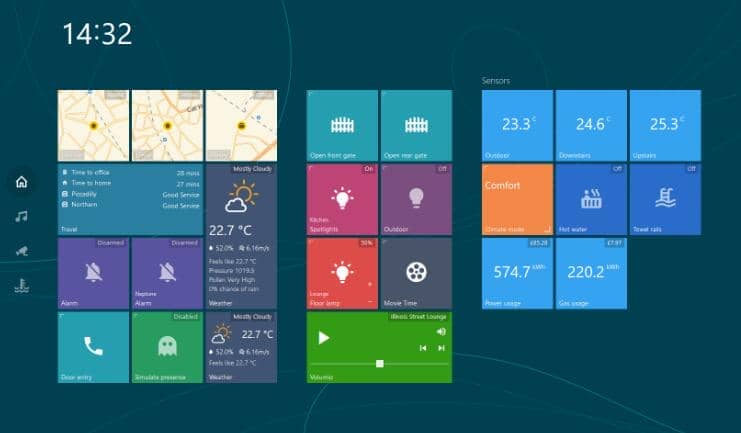
配置
config.js 将使用以下字段初始化全局CONFIG对象:
var CONFIG = {
   /* customTheme: specify a custom theme for your dashboard
    * Valid options: null, CUSTOM_THEMES.TRANSPARENT, CUSTOM_THEMES.MATERIAL, CUSTOM_THEMES.MOBILE, CUSTOM_THEMES.COMPACT, CUSTOM_THEMES.HOMEKIT, CUSTOM_THEMES.WINPHONE, CUSTOM_THEMES.WIN95 or a custom theme you have created
    * Default: null. Array supported
    */
   customTheme: null,

   /* transition: The transition effect used between Pages
    * Valid options: TRANSITIONS.ANIMATED, TRANSITIONS.ANIMATED_GPU, TRANSITIONS.SIMPLE
    */
   transition: TRANSITIONS.ANIMATED,

   /* tileSize: The default size (in pixels) of a tile */
   tileSize: Number,

   /* tileMargin: The default margin (in pixels) between tiles */
   tileMargin: Number,

   /* entitySize: Enum size of tile's content (SMALL, NORMAL, BIG)*/
   entitySize: ENTITY_SIZES.NORMAL,

   /* groupMarginCss: CSS margin statement to override the default margin for groups */
   groupMarginCss: '20px 40px',

   /* serverUrl: The URL to your HomeAssistant server */
   serverUrl: 'http://hassio.local:8123',

   /* wsUrl: The URL to your HomeAssistant Websocket connection.
    * If HomeAssistant is behind SSL, replace ws:// with wss://
    */
   wsUrl: 'ws://hassio.local:8123/api/websocket',

   /* authToken: Optional Long live token that you can create in your HomeAssistant
    */
   authToken: null,

   /* pingConnection: Set to false disable pinging of the websocket connection.
    * Otherwise, a ping will be sent every five seconds, and if a response is not received in 3 seconds,
    * a reconnect will be attempted. If not included in the config file, setting defaults to true.
    */
   pingConnection: true,

   /* debug: Toggle for extra debugging information.
    * If enabled, will print info about state changes and entities to console.
    */
   debug: Boolean,

   /* timeFormat: 12 for AM/PM marker, 24 for 24 hour time (default) */
   timeFormat: Number,

   /* Google API key is required if you are using device tarcker tiles along with Google Maps.
    * More info here: https://developers.google.com/maps/documentation/maps-static/usage-and-billing
    */
   googleApiKey: null,

   /* menuPosition: LEFT (default) or BOTTOM */
   menuPosition: MENU_POSITIONS.LEFT,

   /* hideScrollbar: Hiding horizontal scrollbar */
   hideScrollbar: false,

   /* groupsAlign: Align groups HORIZONTALLY (default) or VERTICALLY */
   groupsAlign: GROUP_ALIGNS.HORIZONTALLY,

   /* pages: A list of page objects. See documentation on Pages below */
   pages: [],

   /* events: A list of events. See documentation on Events below */
   events: [],

   /* screensaver: A digital picture frame with a clock. Appears when
    * the dashboard has been idle
    * https://github.com/resoai/TileBoard/wiki/Screensaver-configuration
    * (optional)
    */
   screensaver: {
     /* timeout: Idle time (in seconds) before the screensaver will show */
     timeout: 300,

     /* slidesTimeout: Amount of time (in seconds) to show each slide */
     slidesTimeout: 10,

     styles: { fontSize: '40px' },

     /* read more in wiki */
     leftBottom: [{ type: SCREENSAVER_ITEMS.DATETIME }],

     /* slides: Array of paths to pictures. */
     slides: [
       {bg: 'images/bg1.jpeg'},
       {bg: 'images/bg2.png'},
       {bg: 'images/bg3.png'}
     ]
   },

   /* header: object of header. Will be applied globally
    * https://github.com/resoai/TileBoard/wiki/Header-configuration
    * (optional)
    */
   header: DEFAULT_HEADER,
}
仅供个人学习参考/导航指引使用,具体请以第三方网站说明为准,本站不提供任何专业建议。如果地址失效或描述有误,请联系站长反馈~感谢您的理解与支持!
更多»
热门资源
Materialize
基于Material Design的现代响应式前端框架
官网
GitHub
Element UI
一套基于 Vue 2.0 的桌面端组件库
官网
GitHub
Muse-UI
基于 Vue2.0 的 Material Design UI 库
官网
GitHub
sb-admin
基于Bootstrap简约美观的后台管理模板
官网
GitHub
Magic UI
为设计工程师打造的UI库
官网
GitHub
Vue-Access-Control
Vue权限管理解决方案
官网
GitHub
RmlUI
桌面端GUI开发框架
官网
GitHub
HeroUI
基于TailwindCSS构建的React 现代UI框架
官网
GitHub
tweakcn
shadcn/ui组件可视化无代码编辑器
官网
GitHub
类似于TileBoard的资源
luda
一个用于现代Web开发的轻量级和响应式UI框架
官网
GitHub
AlloyUI
一套功能丰富的 UI 框架
官网
GitHub
Vuesax
Vuejs 管理仪表板模板
官网
GitHub
Ark UI
创建可组合的、易于访问的 UI 组件,用于构建复杂的界面
官网
GitHub
umy-ui
基于 Vue 2.0 的桌面端组件库
官网
GitHub
Adminify
基于Vuetify material的后台管理面板
官网
GitHub